Mobile Recharge Auto Pay
Mobile Recharge Auto Pay
Mobile Recharge is now automatic! No more remembering to recharge your own or your loved ones’ numbers again and again. Simply set the date, amount, and other details for your or your loved one’s mobile number in ‘Auto Pay’ on the bKash App, and the recharge will be completed automatically on the selected date. Set up Auto Pay today and stay worry-free about recharges!
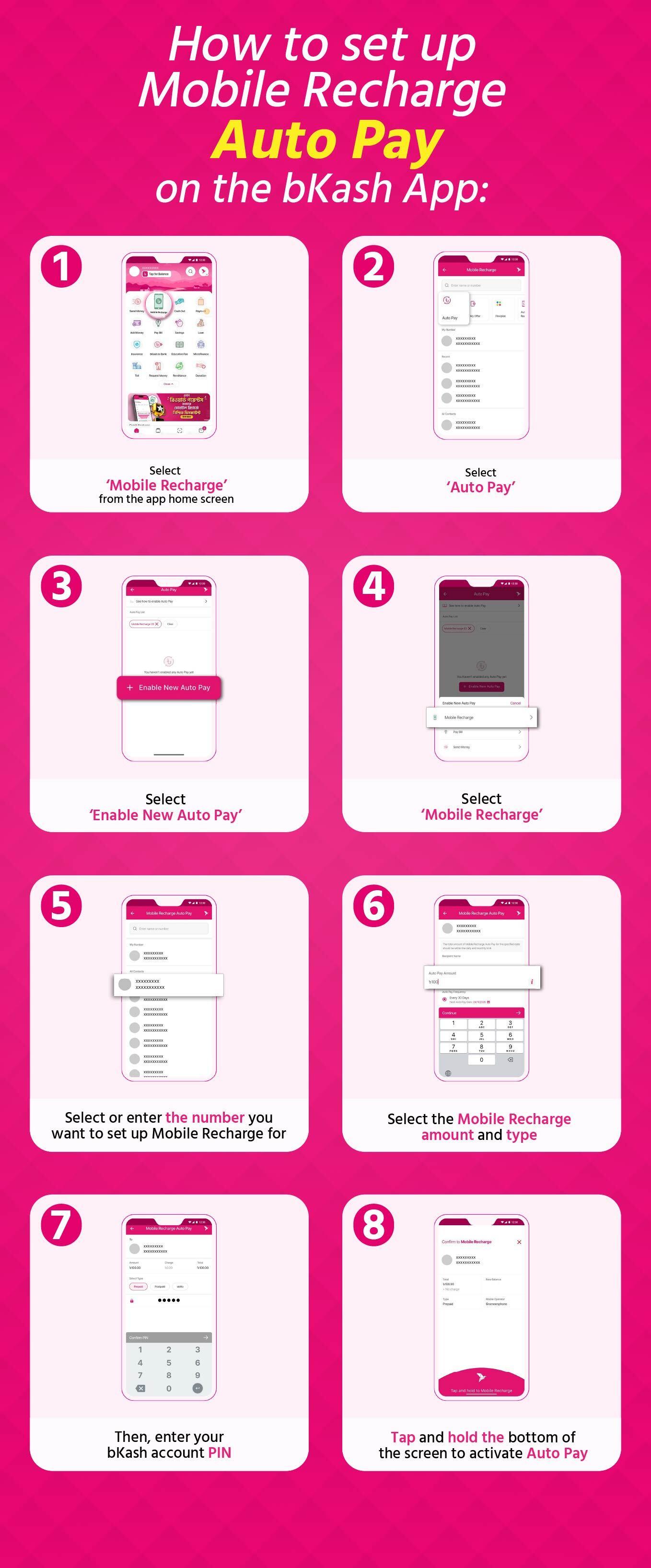
How to set up Mobile Recharge Auto Pay on the bKash App
Terms & Conditions
• By activating Auto Pay, you authorize bKash to make Auto Pay transactions from your bKash account to the recipient’s bKash account according to the Auto Pay details provided by you, such as the Mobile Recharge date, start date, and recharge amount for the specified number.
• You will receive an app notification before the scheduled Auto Pay date. You must have sufficient balance in your bKash account on the Mobile Recharge Auto Pay date for the Auto Pay transaction to be successful.
• You will receive a confirmation SMS and app notification once Auto Pay is successfully activated.
• You will receive a successful transaction notification for each successful Auto Pay.
• You will receive a notification if the Auto Pay transaction is unsuccessful.
• No additional charges apply to Auto Pay transactions.
• You can cancel the Auto Pay service and will receive a notification once it is canceled. You can also reactivate Auto Pay as many times as you want.
• If you face any issues while canceling the Auto Pay service, please contact bKash Customer Service at 16247.
• Your bKash account must remain active on the scheduled Auto Pay date. bKash will not be liable if the Mobile Recharge fails due to any state tag or account block issue.